Copy everything.
Choose when you paste.
CopyCat keeps your latest copies in a fast, private stack so you can paste the right one without jumping back and forth.
Download for macOS
CopyCat keeps your latest copies in a fast, private stack so you can paste the right one without jumping back and forth.
Download for macOS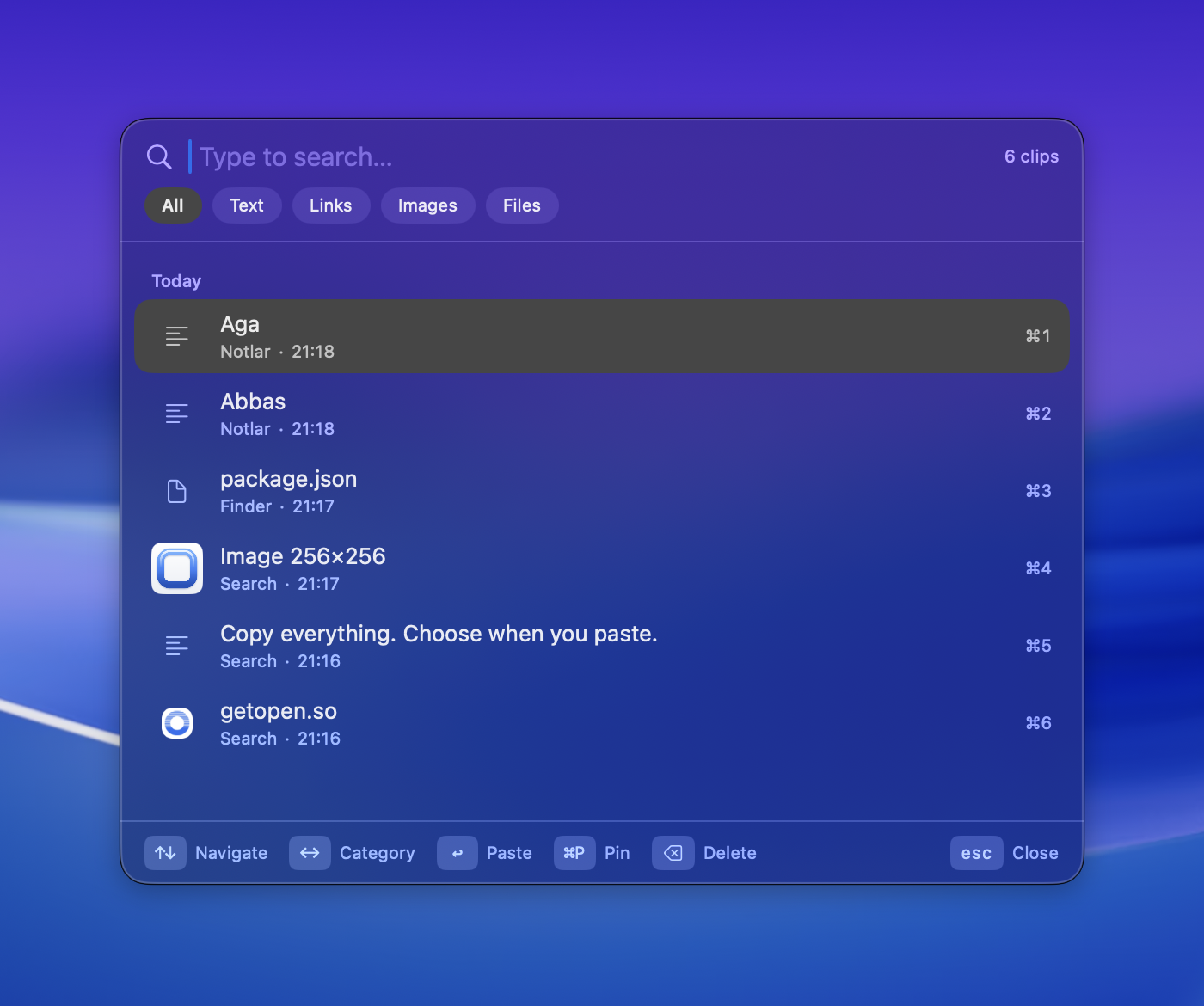
How it works
Stop bouncing between windows to move a few values. Collect first, paste later.
Grab a name, an email, a link, an image — as many things as you like, from any app. CopyCat quietly stacks them up.
A compact palette appears over whatever you're doing. Type to search, use the arrows, or hit ⌘1–9 for the quick picks.
Hit Return — CopyCat restores focus to the app you were in and pastes for you. Files paste as files, images as images.
Everything you copy
CopyCat understands what you copied and shows it the right way — thumbnails for images, swatches for colors, favicons for links.
Features
Everything you need from a clipboard companion — nothing you don't.
The panel filters instantly with every keystroke. A thousand clips, one frame — no waiting, no loading.
⌘P keeps a clip at the top forever. Pinned clips never expire from the stack, even across restarts.
Arrows to move, ⌘1–9 to paste instantly, ⌫ to delete, ←→ for categories. Your hands never leave the keys.
Pinned, Today, Yesterday, and beyond — your history reads like a timeline, with source app and time on every clip.
Anything marked sensitive or transient by password managers is never captured. Not even for a second.
Tell CopyCat to ignore any app entirely — copies made there never enter your stack.
Real Swift, real AppKit. Near-zero idle CPU, a 2 MB download, and a panel that opens before you blink.
New versions arrive quietly with a one-click install — signed, notarized, and verified by macOS every time.
Hit Return and CopyCat flips back to the app you were in and pastes for you — files land as files, images as images.
Your clipboard is some of the most sensitive data on your Mac. CopyCat treats it that way.
Pricing
No subscription. Your license key arrives by email right after checkout.
FAQ
All of yours. One license covers every Mac you personally own — activate and deactivate machines yourself, no emails to support needed.
Instead of a trial we offer a straightforward 7-day money-back guarantee. Buy it, use it for real, and if it's not for you, get a full refund — no questions asked.
No. Everything you copy stays on your Mac. The app talks to the network only for license activation, update checks, and (optionally) fetching link favicons — never your clipboard content. Details in the privacy policy.
The App Store sandbox forbids the one thing that makes CopyCat magical: pasting directly into the app you were using. So we ship it ourselves — signed, notarized, and verified by Apple's Gatekeeper on every launch.
macOS 26 and later, on both Apple silicon and Intel Macs.
Untouched. CopyCat lives entirely behind ⌘⇧V — your muscle memory stays exactly as it is.